

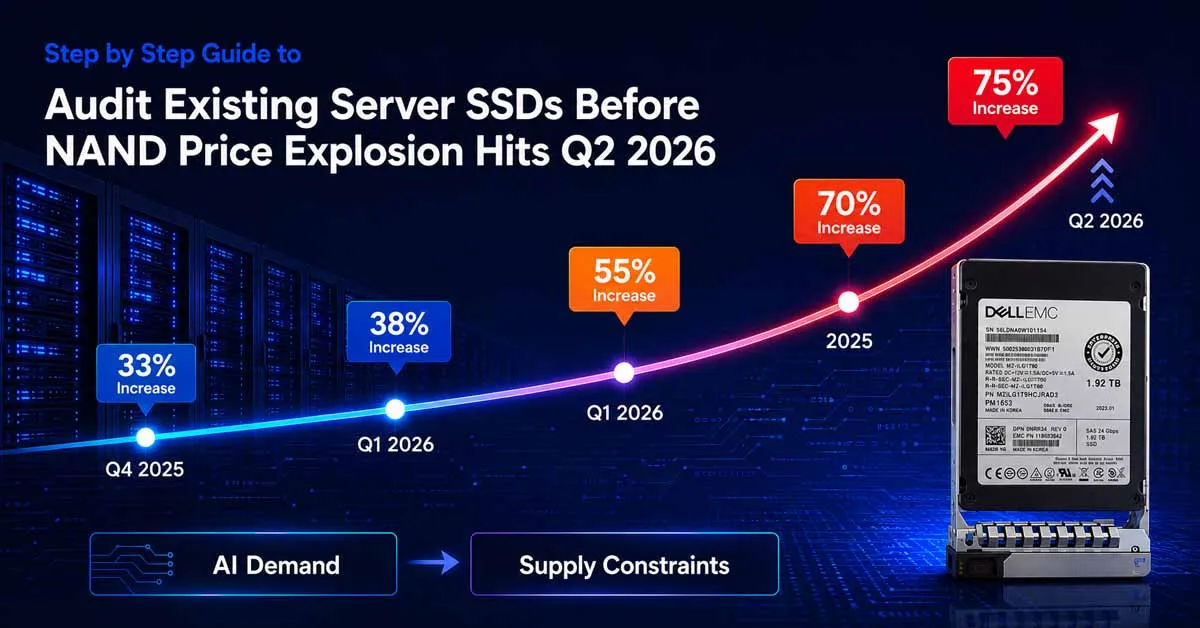
NAND flash contract prices are forecast to rise by 70% to 75% quarter-over-quarter in Q2 2026, according to Trend Force’s latest memory pricing survey. Enterprise server SSDs are at the centre of this squeeze; manufacturers are redirecting production capacity toward AI infrastructure orders, and all available 2026 NAND capacity has already been contracted by hyperscale cloud providers.
For IT teams managing server fleets across Dell, HPE, IBM, and Lenovo platforms, the cost and availability impact of this cycle is direct and immediate. New server SSDs that were budgeted at 2024 prices will cost substantially more on reorder. Drive lead times are extending. And the cost difference between new and certified refurbished server SSDs is widening by the quarter.
Why the Q2 2026 NAND Price Explosion Matters to Enterprise IT
The NAND flash market has experienced its most severe pricing cycle in years. Trend Force reports that NAND prices rose 33 - 38% quarter-over-quarter in Q1 2026. The Q2 2026 forecast is worse: a further 70 - 75% increase is projected, driven by AI infrastructure demand that shows no sign of slowing.
Phison's CEO confirmed publicly that all 2026 NAND production capacity has already been sold out, purchased primarily by large cloud service providers securing long-term allocations. Meaningful new fab capacity is not expected online before late 2027.
For enterprises, this means three practical consequences:
- New server SSD prices will be materially higher throughout 2026 and into 2027 than they were in 2024 or early 2025.
- Lead times for specific enterprise SSD models - Dell, HPE, IBM, Lenovo OEM variants are extending as supply tightens.
- The cost gap between new OEM server SSDs and certified refurbished server SSDs is widening, making refurbished stock the most effective cost management tool currently available.
Conducting an infrastructure audit now before the next procurement cycle gives IT teams the information they need to prioritise replacements, avoid emergency purchases at peak pricing, and plan refurbished procurement strategically.
The Server SSD Audit: Step by Step
This audit framework is designed for IT teams managing server fleets of any size. It can be completed in a single working day for most environments, and it produces the specific data points needed to make informed procurement decisions before the Q2 2026 pricing impact fully lands.
Step 1: Build a Complete Server SSD Inventory
Before you can assess health or risk, you need to know exactly what you have. Start by generating a full inventory of every server SSD deployed across your infrastructure across all platforms and server brands.
For each drive, capture: server hostname or asset tag, drive model and OEM part number, interface type: SAS, SATA, NVMe; form factor (2.5" SFF or 3.5" LFF), capacity, and which server generation the drive is installed in (e.g., Dell PowerEdge Gen 14/15, HPE ProLiant G9/G10, IBM Power9/Power10, Lenovo Think System).
Tools to Pull Inventory Data
- Dell: Use iDRAC's storage inventory view or Dell Open Manage Server Administrator (OMSA) to list all SSDs with model, part number, and slot location.
- HPE: HPE iLO Amplifier Pack or HPE Smart Storage Administrator (SSA) provides a complete storage device inventory per server.
- IBM: IBM Storage Insights or the IMM2/XCC management interface exposes drive inventory across Think System and Power platforms.
- Lenovo: Lenovo XClarity Administrator (LXCA) or the XCC web interface provides drive model, capacity, and health status per node.
- Cross-platform: Tools such as Ansible, Puppet, or a CMDB/ITSM platform can aggregate inventory across mixed-vendor environments at scale.
Export this data to a spreadsheet. You now have the baseline every SSD in your environment, mapped to its server and platform.
Step 2: Read SMART Data and Wear Indicators
SMART (Self-Monitoring, Analysis and Reporting Technology) data is the primary source of SSD health information. Every enterprise server SSD regardless of brand reports SMART attributes that indicate wear progression, error rates, and estimated remaining life.
The most important SMART attributes to review for enterprise server SSDs are:
- Wear Leveling Count (ID 173): Starts at 100, declines toward zero. Below 20 warrants immediate replacement planning. Below 10 means the drive is at end-of-life.
- Total Bytes Written / Total LBAs Written (ID 241): Compare against the drive's rated TBW (Terabytes Written) endurance specification to calculate remaining write life.
- Reallocated Sector Count (ID 5): Any non-zero value above a low threshold indicates NAND cell failures. A rising count signals accelerating degradation.
- Uncorrectable Error Count (ID 187 / 198): Should be zero on a healthy drive. Any non-zero value on a production server SSD requires urgent attention.
- Power-On Hours (ID 9): Cross-reference with total writes to identify drives that are heavily written relative to their uptime a signal of high-intensity workloads wearing drives faster than average.
How to Access SMART Data per Platform
On Linux servers, the smartmontools package provides the smartctl command. Running “smartctl -a /dev/sdX” returns the full SMART attribute table for any drive. On Windows Server, PowerShell with the Get-PhysicalDisk cmdlet returns basic health status, and vendor management tools provide full SMART detail.
Platform management tools Dell OMSA, HPE SSA, IBM Storage Insights, Lenovo LXCA all surface SMART data through their native interfaces without requiring command-line access on each individual server.
Step 3: Classify Each Drive by Risk Level
Once you have SMART data for every drive in your inventory, classify each one into one of three risk tiers. This classification drives your procurement and replacement prioritisation.
- High Risk (Replace Immediately): Wear Leveling Count below 20, any non-zero Uncorrectable Error count, Reallocated Sector Count rising over successive readings, or TBW consumption above 85% of rated endurance. These drives should not remain in production without a hot spare already in place.
- Medium Risk (Monitor and Plan): Wear Leveling Count between 20 and 50, TBW consumption at 60–85% of rated endurance, or drives with over 40,000 power-on hours under moderate write workloads. These drives are functional but should be on the replacement schedule within the next 6 - 12 months.
- Low Risk (Document and Review Annually): Wear Leveling Count above 50, TBW consumption below 60%, no SMART warnings. These drives are healthy document them and review in the next annual audit cycle.
This three-tier classification gives you a clear, prioritised replacement list before the next procurement cycle opens.
Step 4: Verify Firmware and Compatibility
Drive health is only one dimension of the audit. Firmware currency and platform compatibility are equally important particularly in enterprise environments where storage controllers enforce specific firmware version requirements.
For each SSD in your inventory, verify:
- Firmware version: Check the installed firmware version against the latest available from the OEM (Dell, HPE, IBM, Lenovo). Outdated firmware can cause compatibility issues with newer RAID controllers and management tools, and some firmware versions carry known reliability bugs that have been patched in later releases.
- Server generation compatibility: Enterprise server SSDs are qualified per server generation. An HPE SSD certified for G9 may not be fully supported in G10 without a firmware update. A Dell SSD qualified for Gen 13 may have limitations in Gen 15. Verify OEM Quick Specs or compatibility matrices before adding drives to existing RAID arrays.
- RAID configuration health: Review the current RAID controller status for each array. Note any drives operating in degraded mode, any rebuild operations in progress, and the current hot spare allocation. An array without a configured hot spare is one drive failure away from data loss.
Step 5: Map Procurement Needs and Evaluate Refurbished Options
With your risk classification complete and firmware status verified, you now have the data to build a precise procurement plan before Q2 2026 pricing moves further.
For each High Risk and Medium Risk drive on your replacement list, document the OEM part number, quantity needed, and the server platform it serves. This specificity matters because enterprise server SSDs are not interchangeable across platforms. A Dell PowerEdge SSD and an HPE ProLiant SSD of the same capacity may use different firmware, form factors, or carrier configurations.
Why Refurbished Server SSDs Are the Right Answer
Refurbished server SSDs sourced from a supplier with documented testing processes deliver the same performance as new drives for the workloads they are deployed in. The drives entering the refurbished market today were retired from enterprise environments after three to five years of use, well within their designed operational lifespan.
Server SSD Options by Platform - Dell, HPE, IBM, and Lenovo
Zaco Computer's server SSD inventory covers the four major enterprise server platforms most commonly deployed in Indian, UK, and UAE enterprise environments. All drives are listed with OEM part numbers, and our team provides compatibility verification before dispatch.
Dell PowerEdge Server SSDs
Dell PowerEdge servers support SAS and SATA SSDs in 2.5" SFF form factor across Gen 13, Gen 14, and Gen 15 platforms. Common capacities in our inventory include 480 GB, 800 GB, 960 GB, 1.6 TB, and 1.92 TB in both SAS and SATA interfaces. Part numbers such as 0D35F3 (480 GB SATA), 06NFDV (960 GB SATA), and 0086DD (1.92 TB SAS) are in current stock.
HPE ProLiant Server SSDs
HPE ProLiant G8, G9, and G10 servers use Smart Carrier (SC) SAS and SATA SSDs with firmware validated per server generation. Available capacities span 480 GB, 800 GB, 960 GB, 1.6 TB, and 1.92 TB. Interface options include 6Gbps and 12Gbps SAS and SATA 6Gbps.
IBM Think System and Power Server SSDs
IBM Think System and Power platform servers use SAS and NVMe SSDs optimised for IBM's storage controller architecture. Zaco Computer stocks refurbished IBM server SSDs for Think System and related platforms, covering the SAS and SATA interface range commonly deployed in these environments.
Lenovo Think System Server SSDs
Lenovo Think System servers share platform heritage with IBM Think System and use compatible SSD part numbers in many configurations. Our Lenovo SSD inventory covers SATA and SAS drives for Think System SR530, SR550, and SR650 platforms, available in 480 GB through 1.92 TB capacities.
What Makes a Server SSD Audit Actionable: Key Data Points to Capture
A server SSD audit is only valuable if it produces specific, actionable output. The following is the minimum data set your audit should generate for each drive in the fleet.
- OEM part number and serial number: The part number confirms interface, form factor, and server generation compatibility. The serial number enables warranty status verification and RMA tracking.
- Wear Leveling Count and % remaining: The single most important health indicator. Flags drives approaching end-of-life before failure occurs.
- TBW consumed vs. rated TBW: Quantifies how much write endurance has been used and how much remains. Essential for estimating time-to-replacement under current workloads.
- Power-on hours and total bytes written: Combined, these metrics indicate whether a drive is being used lightly or intensively, and whether its wear progression is within expected parameters.
- RAID array membership and hot spare status: Identifies drives whose failure would immediately place a RAID array in degraded mode, and arrays that have no hot spare configured as protection.
This five-point data set, captured for every server SSD in your inventory, gives you a complete health baseline and a prioritised replacement list tied to real risk, not guesswork.
Ready to act on your audit results with certified refurbished server SSDs?
Zaco Computer supplies certified refurbished server SSDs for Dell, HPE, IBM, and Lenovo platforms. All drives are SMART tested, wear verified, firmware validated, and warranty backed. Enterprises can plan procurement with confidence, supported by compatibility verification and structured part matching aligned with their server infrastructure. We support enterprises across India, the UK, and the UAE with part matching and compatibility verification.
For enquiries, please contact our team or email us at info@zacocomputer.com.
Conclusion
The NAND flash pricing environment in 2026 is the most severe in recent memory. Trend Force data points to NAND contract price increases of 70 to 75% in Q2 2026 alone, following double-digit rises in every quarter since mid-2025. All 2026 production capacity is already allocated to AI infrastructure buyers, and meaningful supply relief is not expected before late 2027.
For IT teams managing Dell, HPE, IBM, and Lenovo server fleets, this represents a direct cost and availability risk to infrastructure that depends on server SSDs for performance-critical and business-critical storage.
The audit process outlined in this guide inventory, SMART data collection, risk classification, firmware verification, and procurement planning takes a day to complete and delivers the specific intelligence needed to act before costs climb further. The window to procure certified refurbished server SSDs at current pricing is open now.
Zaco Computer's server SSD inventory covers all four major enterprise platforms, with stock available for immediate dispatch. Our team provide part-matching support and compatibility verification before every order.
Frequently Asked Questions (FAQs)
Q.1 Why are server SSD prices increasing so sharply in 2026?
NAND flash manufacturers have redirected production capacity toward high-margin AI infrastructure orders, leaving enterprise server SSD supply severely constrained. Trend Force confirmed NAND contract prices rose 33–38% in Q1 2026, with a further 70-75% increase forecast for Q2 2026. Phison's CEO confirmed all 2026 production is already sold out.
Q.2 What SMART attributes matter most when auditing server SSDs?
The five critical attributes are Wear Leveling Count (ID 173), Total Bytes Written vs. rated TBW, Reallocated Sector Count (ID 5), Uncorrectable Error Count (ID 187/198), and Power-On Hours (ID 9). A Wear Leveling Count below 20 or any non-zero Uncorrectable Error count signals immediate replacement priority.
Q.3 Are refurbished server SSDs reliable enough for production workloads?
Yes, when properly tested. Enterprise server SSDs are engineered for continuous 24x7 operation over five or more years. Refurbished units are typically retired after three to four years of corporate use. A drive that passes full SMART diagnostics, wear verification, and firmware validation is operationally indistinguishable from a new drive for standard enterprise workloads.
Q.4 Do Dell, HPE, IBM, and Lenovo server SSDs require brand-specific drives?
Yes, enterprise server SSDs are firmware-validated per OEM platform and server generation. Using an OEM-matched part number ensures compatibility with the server's storage controller, management tools, and RAID configuration. Mismatched drives can cause performance issues or go unrecognised entirely. Zaco Computer supplies platform-specific, OEM part-number-verified drives for all four brands.
Q.5 How much can enterprises save by choosing refurbished server SSDs over new?
Refurbished server SSDs typically cost up to 40% to 60% less than new OEM equivalents at current market pricing and that gap is widening as new SSD prices rise through 2026. For a fleet requiring 20-50 drive replacements, the saving per procurement cycle is significant and directly reduces the budget impact of the NAND price cycle.
Q.6 How often should a server SSD audit be conducted?
For stable environments, a full SMART-based audit every six to twelve months is the standard practice. In high-write workload environments databases, virtualisation hosts, transactional applications quarterly monitoring of Wear Leveling Count and TBW consumption is advisable. The current NAND pricing environment makes an audit before the next procurement cycle especially valuable.