

Introduction
Server downtime remains one of the most expensive problems in modern IT operations. When teams investigate the cause of an outage, they look at the usual suspects first: the CPU, the hard drives, the power supply, or the operating system. These components matter, but the real cause often sits quietly in the background, ignored during routine maintenance and absent from most spare parts inventories.
According to the ITIC 2024 Hourly Cost of Downtime Survey, a single hour of downtime now costs more than 300,000 US dollars for over 90 percent of mid-sized and large enterprises. For critical industries such as banking, healthcare, and manufacturing, the average loss can cross five million dollars per hour. These numbers explain why even small component failures can have very large business consequences.
This article focuses on the server components that are most often overlooked when teams plan for reliability. These are the parts that rarely appear in vendor brochures and tend to be replaced only after they cause a serious outage.
Why Overlooked Components Matter More Than You Think
Modern enterprise servers are built with redundancy in mind. Dual power supplies, RAID arrays, error-correcting memory, and hot-swappable drives all exist to protect against single-point failures. But this redundancy creates a false sense of safety. Downtime is rarely caused by the components that get the most attention. It is caused by the supporting parts that quietly wear out without warning.
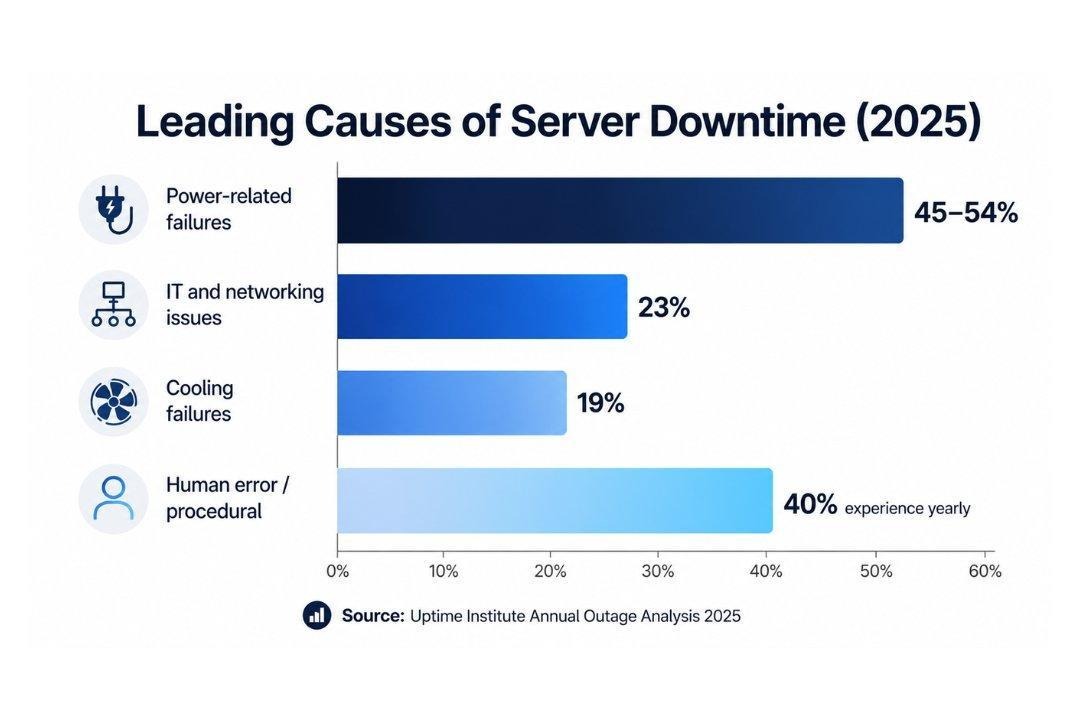
The Uptime Institute Annual Outage Analysis 2025 noted that while overall outage frequency has declined for the fourth consecutive year, IT and network problems alone now account for around 23 percent of impactful outages. Power and cooling remain the largest contributors.
Common Causes of Server Outages at a Glance
The table below summarises the main categories of server-related outages and the smaller components within each that are commonly overlooked during maintenance planning.
The Most Overlooked Server Components That Cause Downtime
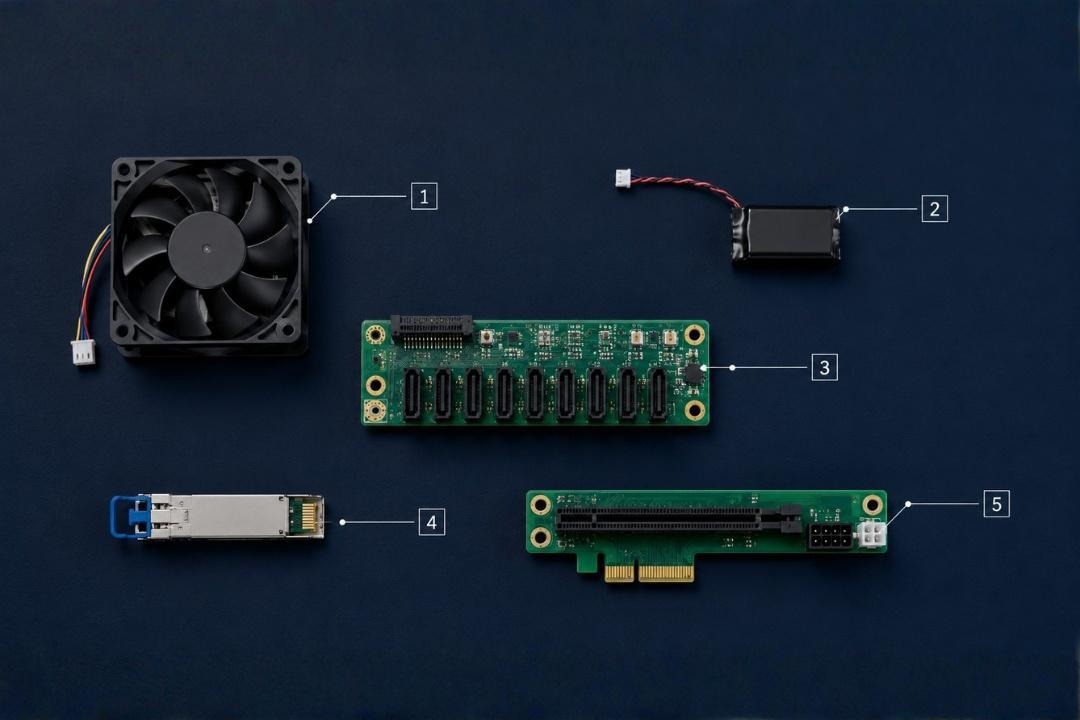
The following components are responsible for a large share of unplanned outages, yet they are rarely included in routine inspection checklists or kept on hand as spares. Each of them deserves more attention than it usually receives.
1. Server Backplanes
The backplane is the printed circuit board that connects hard drives, SSDs, and other modules to the rest of the server. When a backplane fails, all drives connected to it become unreachable at the same time, even if the drives themselves are perfectly healthy. This often looks like a multi-drive failure and can trigger panic among administrators who assume their RAID array has collapsed.
Backplane failures are commonly caused by failed power regulators, damaged connectors, or worn-out SAS expanders. Because backplanes are hidden inside the chassis, they are rarely inspected during normal maintenance. Many organisations do not stock spare backplanes, which can extend an outage by days.
2. RAID Controller Battery Backup Units (BBUs)
RAID controllers use a small onboard battery, sometimes called a BBU or a flash-backed write cache module, to protect cached data during a sudden power loss. When this battery weakens, the controller automatically switches to write-through mode, which dramatically reduces write performance. In some cases, the server may refuse to boot until the battery is replaced.
These batteries typically last between three and five years, but they are almost never replaced proactively. Many teams discover the problem only when applications start to slow down or when storage-related errors appear in monitoring logs.
3. Cooling Fans and Fan Controllers
Cooling failures are the second leading cause of data centre downtime, accounting for around 19 percent of impactful outages according to Uptime Institute research. Inside the server itself, individual fans and their controllers are often ignored until they fail. A single fan that stops spinning may not immediately bring down the system, but it raises internal temperatures and forces the surrounding fans to work harder.
Dust accumulation, bearing wear, and faulty tachometer signals are common causes. Servers may also enter a protective shutdown when a fan controller reports incorrect data, even if the actual airflow is adequate. Keeping spare fans on hand and replacing them at the first sign of irregular RPM readings is one of the simplest ways to prevent thermal incidents.
4. DIMM Sockets, Risers, and Memory Channels
Memory modules themselves are reliable, but the sockets they sit in are mechanical components that can degrade over time. Repeated insertion and removal during upgrades, vibration in rack-mounted systems, and oxidation on contact pins can all cause intermittent memory errors. These errors are particularly hard to diagnose because they often appear as random application crashes rather than as a clear hardware fault.
PCIe risers, which connect expansion cards to the motherboard, suffer from similar problems. A loose or damaged riser can cause a network card, GPU, or storage controller to disappear from the system. Because risers are not usually monitored, the resulting downtime can take hours to trace.
5. Power Supply Capacitors and Redundant PSU Imbalances
Most enterprise servers ship with dual power supplies, which gives the impression that power-related failures inside the chassis are fully covered. In practice, capacitors inside power supplies age and dry out, especially in environments with high ambient temperatures. A failing capacitor may still allow the PSU to operate but can introduce voltage ripple that damages other components over time.
Another overlooked issue is power supply imbalance. When one PSU in a redundant pair quietly fails, the second PSU carries the full load. If that second unit then fails, the server shuts down completely. Routine load testing is a simple step that many organisations skip.
6. Network Interface Cards and Transceivers
Network interface cards, transceivers, and the cables that connect them are easy to forget because they tend to either work or fail completely. In reality, they often degrade gradually. A failing SFP or QSFP transceiver may cause packet loss, retransmissions, or link flapping long before it stops working entirely. These symptoms are often blamed on the network team or the internet service provider, when the actual cause is a small component inside the server itself.
Keeping a small inventory of spare transceivers and network cards that match the brand and firmware version of the server is a low-cost insurance policy.
How to Build a Spare Parts Strategy That Prevents Downtime
Identifying overlooked components is only the first step. The second step is making sure these parts are available when they are needed. A spare parts strategy should be treated as part of the overall business continuity plan, not as an afterthought. The following points outline what a strong strategy looks like.
- Maintain a tiered spare inventory: Keep critical, fast-failing parts such as fans, power supplies, RAID batteries, and transceivers on site. Stock medium-priority items such as backplanes and risers within a short delivery window.
- Match firmware and revision levels: Spare parts that have different firmware can introduce new failures. Document the firmware version of every server and flash spares to the same level before storage.
- Schedule proactive replacements: Components such as RAID batteries, cooling fans, and UPS batteries have predictable lifespans. Replace them on a planned schedule rather than waiting for failure.
- Work with certified refurbished part suppliers: OEM parts are not always available for older server models. A trusted refurbished parts provider that tests and warranties every component can fill this gap reliably.
- Document every replacement: A clear log of which parts were replaced, when, and by whom helps spot patterns. Repeated failures usually point to a deeper issue such as poor airflow or unstable power.
The Real Cost of Ignoring Small Components
It is easy to view a single fan, a small battery, or a transceiver as a low-value item that does not deserve the same attention as a CPU or a hard drive. The downtime numbers tell a different story. ITIC research found that 41 percent of large enterprises estimate hourly downtime costs of between one million and five million dollars.
Many of these incidents trace back to small, low-cost parts that were either missing from the spare inventory or replaced too late. A cooling fan that costs a few hundred rupees can be the difference between a healthy server and a thermal shutdown that takes an entire business application offline for hours. Investing in a complete spare parts programme is one of the highest-return decisions an IT team can make.
Case Study: Rapid Recovery for a Leading Oil & Gas Provider
A leading oil and gas provider in India experienced critical server downtime after repeated system board voltage alerts. The existing support provider was unable to identify the root cause and recommended replacing the entire server.
After conducting a detailed assessment, Zaco Computers traced the issue to a faulty power supply backplane and related hardware components. By replacing only the affected parts, the server was restored within one working day without requiring a full infrastructure replacement.
Results were clear:
- Server restored within 24 hour
- Avoided full server replacement cost
- Eliminated data migration risks
- Extended the life of the existing infrastructure
With rapid diagnostics, access to the right spare parts, and targeted hardware replacement, downtime was minimized while extending the life of the existing infrastructure.
Talk to our team about building a customised spare parts plan for your server fleet.
Zaco Computer maintains a deep, tested inventory of new and certified refurbished components processors, RAM, hard drives, SSDs, backplanes, RAID batteries, cooling fans, power supplies, DIMMs, risers, NICs, and transceivers for Dell, HPE, IBM, Cisco, and Lenovo servers, including hard-to-source parts for older and EOL models the OEM no longer stocks. Every component is tested, firmware-matched, and warranty-backed. Our technical team helps you map the right tiered spare inventory to your environment, align firmware revisions across production and spares, and schedule proactive replacements before parts fail with global delivery when you need a part fast. Get in touch with Zaco Computer for expert guidance and a tailored quote.
Conclusion
Server downtime is rarely caused by the components that receive the most attention. Backplanes, RAID battery backup units, cooling fans, DIMM sockets, power supply capacitors, and network transceivers quietly carry a large share of the responsibility for unplanned outages. Because these parts are inexpensive compared with the cost of an outage, the case for stocking, monitoring, and replacing them proactively is very strong.
A good spare parts strategy is not just about having parts on a shelf. It is about understanding which components are most likely to fail, matching firmware revisions, replacing ageing parts on a planned schedule, and working with a trusted supplier that can deliver tested components on short notice. Done well, this approach turns spare parts management from a reactive expense into a long-term investment in uptime and business continuity.
If your organisation is serious about reducing unplanned downtime, the next step is to audit your current spare parts inventory and identify the gaps. Begin with the overlooked components listed in this article.
Frequently Asked Questions
Q.1 Which server component fails most often without warning?
Cooling fans and RAID controller battery backup units tend to fail with very little warning. Fans can stop spinning suddenly due to bearing wear, and RAID batteries can lose capacity over time, shifting the controller into a slower write-through mode.
Q.2 How often should server spare parts be reviewed?
A full review of the spare parts inventory should happen at least once every six months. Check the condition of stored parts, confirm that firmware versions still match production servers, and update items based on recent failure patterns. High-availability environments may need a quarterly review.
Q.3 Are refurbished server spare parts safe to use in production?
Yes, certified refurbished parts from a reputable supplier are safe for production use. The key is to choose parts that have been tested, cleaned, reflashed to current firmware, and backed by a warranty. Refurbished components are often the only practical option for older server models that the original manufacturer no longer supports.
Q.4 Why does a single failed fan sometimes shut down an entire server?
Most enterprise servers have built-in thermal protection. When a fan fails or reports incorrect speed data, the firmware may decide that the cooling system can no longer guarantee safe operating temperatures and initiates an emergency shutdown to protect the CPU and other components from heat damage.
Q.5 How can firmware mismatches cause downtime?
Modern servers depend on tight coordination between firmware on the motherboard, RAID controller, network cards, and drives. A spare part with older or newer firmware than the rest of the system can introduce bugs, performance issues, or unexpected reboots. Maintaining a documented firmware baseline and updating spares to match is essential.
Q.6 What is the difference between hot-swap, hot-plug, and cold-spare components?Hot-swap parts can be replaced without shutting down the server. Hot-plug parts can be added while the server is running but may require additional configuration. Cold-spare parts require the server to be powered off before installation.
Q.7 Where can I source reliable spare parts for Dell, HPE, IBM, Cisco, and Lenovo servers?
Zaco Computer offers a wide range of new and certified refurbished spare parts for all leading server brands, including Dell, HPE, IBM, Cisco, and Lenovo. Every part is tested and supported by global delivery and expert technical guidance. You can explore the full catalogue at the Zaco Computer spare parts store.